Moomin and nfo files for Jellyfin
Sep 9th, 2026
Code in this blog post was written with versions: Python: 3.14 , zsh: 5.9
Tove Jansson’s Moomins are an incredible piece of the Finnish cultural history and the Japanese tv show Moomin (Tanoshî Mûmin ikka) from 1990s that was then dubbed into Finnish by Yleisradio is the kids tv show I grew up with.
Since I now have nephews, I figured it would be a good time to digitise the old collections to put into my personal media server in case we need emergency Moomins to watch with the kids since I won’t be bringing the DVDs (and a DVD player) with me on every trip.
I use Jellyfin to stream my personal files and usually it’s very hands off in discovering the metadata for tv shows and episodes. The challenge with Moomin is that when Yleisradio dubbed the Japanese animations to Finnish, they skipped three episodes because they felt they weren’t quite appropriate. So the information in sites like IMDB is not quite as usable.
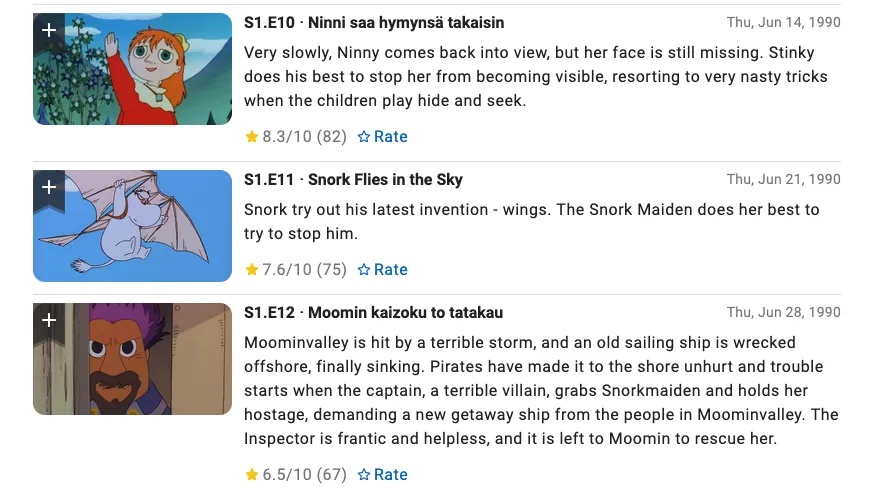
The other problem is that IMDB has very interesting data. Episode 10 has a Finnish name, episode 11 has an English name and episode 12 (which is missing from the original Finnish one; it was later dubbed to Finnish by MTV when they remade all of the episodes later in the decade — with significantly worse quality than the originals) has a Japanese name.
Luckily, Finnish Wikipedia has the right data and Jellyfin supports providing metadata through local .nfo files. With a little bit of zsh, Javascript and Python magic, I was able to create a good set of metadata to make Jellyfin show the right information.
Step 0: Understanding .nfo files
The documentation for .nfo files is not very good. I’ve spent quite a lot of time and trial-and-error to figure out how these should work.
These .nfo files are XML files with a specific elements that media server softwares like Jellyfin, Plex and Kodi read.
Let’s say we have the following directory structure:
Moomin (1990)/
| S01/
	| S01E01...mp4
	| S01E02...mp4
	| ... and so on
| S02/
	| S02E01...mp4
	| ... and so on
We need three types of nfo files:
tvshow.nfo in the root folder,
season.nfo in both of the season folders
and S01E01...nfo files per each episode
where the filename matches the episode filename.
First, I created tvshow.nfo by hand,
following
the instructions in Kodi wiki.
<?xml version="1.0" encoding="UTF-8" standalone="yes"?>

<tvshow>
  <title>Muumilaakson tarinoita</title>
  <plot>
	  Muumilaakson tarinoita on vuosina 1990–1992 Japanissa,
	  Suomessa ja Alankomaissa tehty animoitu televisiosarja,
	  joka kertoo Tove Janssonin luomien muumien ja heidän
	  ystäviensä seikkailuista Muumilaaksossa.
	  Japanissa tuotettu sarja pohjautuu pääosin Tove Janssonin
	  Muumi-kirjoihin sekä Tove ja Lars Janssonin
	  Muumipeikko-sarjakuviin.
  </plot>

  <actor>
    <name>Leena Uotila</name>
    <role>Kertoja</role>
  </actor>

  <actor>
    <name>Rabbe Smedlund</name>
    <role>Muumipeikko</role>
  </actor>

  // More actors...
</tvshow>
Jellyfin will fill in the missing information if it can from external metadata providers.
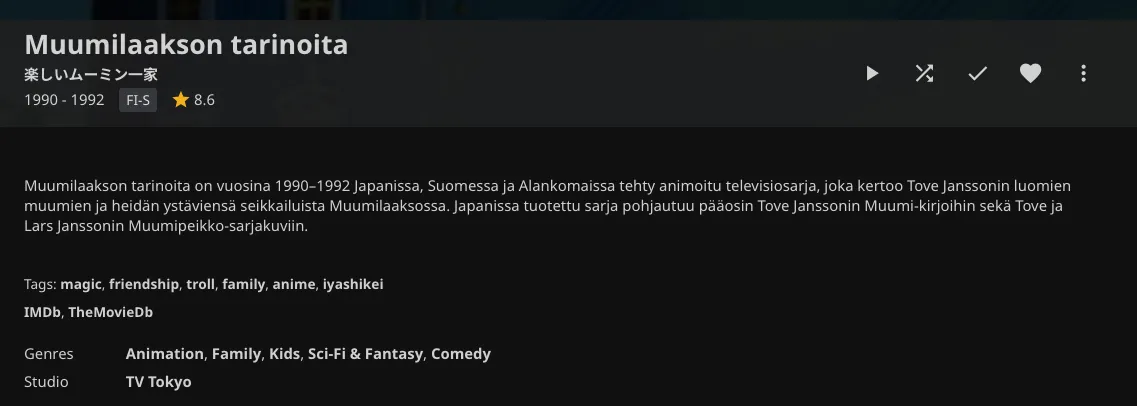
I did the same for S01/season.nfo and
S02/season.nfo but instead of wrapping
the data in tvshow tag, you use
season.
Creating the episode specific nfo files, I did some programming.
Step 1: zsh shell scripting to create nfo files
For the first step, I used zsh shell script to create an NFO file for each episode file. This is kinda optional because you could do this directly in the Python script in step 3 but when I started this process, I didn’t know I was going to do that so I started with this.
#!/bin/zsh

for file in *.mp4
do
  nfo_name="$(print ${file:t:r}).nfo" # print is zsh specific command
  touch "$nfo_name"
done
Here, I use zsh’s modifiers to craft a new filename and then touch to create empty nfo files.
Step 2: Crafting the XML from Wikipedia entry
Since Wikipedia had the information about each episode, I opened the page and Developer Console and wrote a bit of Javascript.
function getEpisodesInfo(sectionId) {
	const episodes = document.querySelectorAll(`section#${sectionId} section`)
	const nfos = Object.values(episodes).map(ep => {
		const title = ep.querySelector('h4').textContent.split('/')[0].replaceAll(/\d+\./g, '').trim()
		const plot = ep.querySelector('p').textContent
	    return `<?xml version="1.0" encoding="UTF-8" standalone="yes" ?><episodedetails><title>${title}</title><plot>${plot}</plot></episodedetails>`
	})

	return nfos
}

const first = getEpisodesInfo('mwBhY')
const second = getEpisodesInfo('mwB3w')

console.log([...first, ...second].join('\n\n')) // then copy-pasting that to a episode-infos.nfo file
In this case, there are two sections: one for the first 78 episodes (Tanoshii Mūmin Ikka series) and another for the rest (Tanoshii Mūmin Ikka: Bōken Nikki series). Both of them have similar structure so the function extracts the information for all episodes.
I chose to include the first paragraph after each episode’s title since the second usually adds some additional meta information about the characters or what they do for the first time in the series.
For each episode, I create an XML snippet with
episodedetails element with title and
plot details.
I then console.log all of the episode snippets to the console and copy-pasted to a file for the next step. I split the snippets into two files: one for season 1 and another for season 2.
Here’s what the file looks like. Couple of important formatting notes: each section should be separated from each other by an empty line and that should be the only empty lines in the file.
<?xml version="1.0" encoding="UTF-8" standalone="yes"?>
<episodedetails>
    <title>Vedenneito</title>
    <plot>Nipsu lähtee etsimään kultaa Yksinäisiltä vuorilta ja päätyy lammelle, josta ilmestyy
        kuvankaunis vedenneito. Vedenneito aiheuttaa riippuvuuden Muumilaakson miehille, minkä takia
        he menevät aikaisin aamusta lammelle ja saapuvat kotiin illalla väsyneinä.</plot>
</episodedetails>

<?xml version="1.0" encoding="UTF-8" standalone="yes"?>
<episodedetails>
    <title>Timantti</title>
    <plot>Mymmeli on löytänyt timanttisormuksen, ja kun kukaan ei ole tullut etsimään sitä, antaa
        Poliisimestari sen Mymmelille. Vilijonkka saa Mymmelin uskomaan, että timanttisormuksen
        omistajan täytyy asua ja pukeutua hienosti ja hankkia palvelija. Niinpä Mymmeli ja Myy
        alkavat elää hienosti, mutta kaikki ei suju niin kuin pitäisi.</plot>
</episodedetails>

<?xml version="1.0" encoding="UTF-8" standalone="yes"?>
<episodedetails>
    <title>Muumipapan toinen nuoruus</title>
    <plot>Eräänä aamuna Muumipappa lähtee aamukävelylle ja huomaa unohtaneensa silinterihattunsa.
        Hän epäilee tulevansa vanhaksi ja ryhtyy kuntoilemaan pysyäkseen nuorena. Lopulta hän tekee
        suuren elämänmuutoksen ja muuttaa yön päiväksi ja toisinpäin.</plot>
</episodedetails>
It’s not a valid XML file but rather a source file we use to create them.
Step 3: Python to write the data into nfo files
Next step is to read this data and write it to the nfo files for each episodes. As I mentioned earlier, I precreated all the nfo files but you could as well just loop over mp4 files and then create files based on those names.
"""Write corresponding XML into a NFO file per episode.

NFO info should be in a file where each episode is split with an empty line.

License: MIT
Author: Juhis <juhis@hamatti.org>
"""

import os
from typing import List


def get_nfo_files() -> List[str]:
    """Get a list of nfo files in current folder."""
    nfos = []
    for _, _, files in os.walk("."):
        for file in files:
            if (
                not file.endswith(".nfo")
                or file == "episode-infos.nfo"
                or file.startswith(".")
                or file == "season.nfo"
            ):
                continue
            nfos.append(file)

		# Important for the filenames to be in same order
		# as the sections in file we created in last step.
    return sorted(nfos)


def read_nfo_info(filename) -> List[str]:
    """Read from file with multiple NFO definitions, separated by empty lines."""
    with open(filename, "r") as nfo:
        data = nfo.read()
    return data.split("\n\n")


if __name__ == "__main__":
    nfo_files = get_nfo_files()
    nfo_info = read_nfo_info("episode-infos.nfo")

    # Check that there's the same amount of files and NFO sections.
    assert len(nfo_files) == len(nfo_info)

    for filename, content in zip(nfo_files, nfo_info):
        with open(filename, "w") as nfo_file:
            nfo_file.write(content)
I first find all the episode specific nfo files and then read the data from
the file we created in last step, splitting them by empty lines (\n\n). Then, I use
zip
to combine the two lists and iterate over each file with its corresponding
episode info and write the content into the file.
With 101 episodes split to two seasons, it would have taken ages to copy-paste the information manually. Instead, I spent a good few hours in the middle of the night in my bed to write code to do it. I don’t know if I actually saved any time but I had way more fun writing code to solve it.
Conclusion
I wanted to share this to show how being able to write a bit of code can make life easier and how you can do things in small bits, using different technologies rather than having to always write single application that does everything.
We live in an era where companies are removing previously purchased digital movies and shows from their users, claiming that digital purchases are not purchases. Owning media on DVDs and Blurays is more important than ever if you want to maintain a copy of what you own. For usability’s sake, storing them in a hard drive or local NAS and watching them through Jellyfin or similar helps you enjoy your media more easily and provides a nice backup in case physical discs become damaged.
If something above resonated with you, let's start a discussion about it! Email me at juhis@hamatti.org and share your thoughts . This year, I want to have more deeper discussions with people from around the world and I'd love if you'd be part of that.